Many corporate communities have various tools to “secure” the laptop. However nice it is – it is super inpractical in the real life.
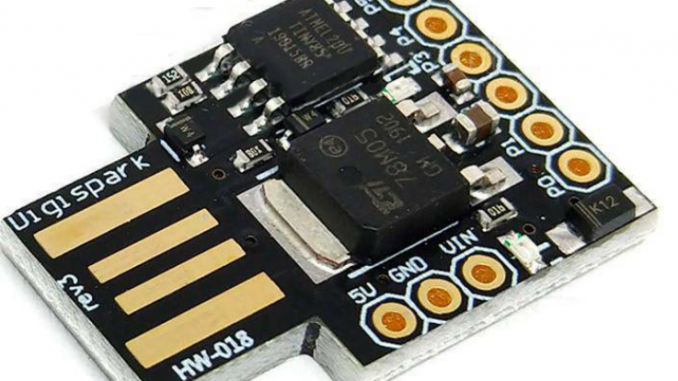
Introducing – mouse mover.
It will present itself as “HID-compliant mouse” and will move few pixels here and there every few seconds. 100% discrete.

The code:
// Digispark Random Mouse Move for anti-screensaver
// Author: shadowandy (shadowandy[dot]sg[at]gmail[dot]com)
// Web: www.shadowandy.net

#include "DigiMouse.h"

// Configurations for Random Mouse Move
// MOUSE_MOVE_L : Number of pixels to move (min)
// MOUSE_MOVE_H : Number of pixels to move (max)
// MOUSE_DELAY_L : Interval (milliseconds) to move the mouse (min)
// MOUSE_DELAY_H : Interval (milliseconds) to move the mouse (max)

#define MOUSE_MOVE_L 1
#define MOUSE_MOVE_H 1
#define MOUSE_DELAY_L 2000
#define MOUSE_DELAY_H 5000

// You really should not change anything below

#define MOUSE_UP 1
#define MOUSE_DN 2
#define MOUSE_LT 3
#define MOUSE_RT 4

unsigned int mouse_move_amount = 1;
unsigned int mouse_led_toggle = 1;
unsigned int mouse_current = MOUSE_UP;
unsigned long mouse_time_current;
unsigned long mouse_time_movement;

void setup() {
  pinMode(0, OUTPUT); //LED on Model B
  pinMode(1, OUTPUT); //LED on Model A
  DigiMouse.begin(); //start or reenumerate USB
  ledToggle();
  mouse_time_movement = millis() + random(MOUSE_DELAY_L, MOUSE_DELAY_H);
  mouse_move_amount = random(MOUSE_MOVE_L, MOUSE_MOVE_H);
}

void ledToggle() {
  switch (mouse_led_toggle) {
     case 1 :
       digitalWrite(0, HIGH);
       digitalWrite(1, HIGH);
       break;
     case 2 :
       digitalWrite(0, LOW);
       digitalWrite(1, LOW);
       break;
     default :
       mouse_led_toggle = 0;
  }
  mouse_led_toggle++;
}

void loop() {
  DigiMouse.update(); // DigiMouse.update() at least every 50ms
  if (millis() > mouse_time_movement) {
    switch (mouse_current) {
        case MOUSE_UP :
          DigiMouse.moveY(-mouse_move_amount);
          break;
        case MOUSE_DN :
          DigiMouse.moveY(mouse_move_amount);
          break;
        case MOUSE_LT :
          DigiMouse.moveX(-mouse_move_amount);
          break;
        case MOUSE_RT :
          DigiMouse.moveX(mouse_move_amount);
          break;
        default :
          mouse_current = 1;
    }
    ledToggle();
    mouse_current = random(1,4);
    mouse_time_movement = millis() + random(MOUSE_DELAY_L, MOUSE_DELAY_H);
    mouse_move_amount = random(MOUSE_MOVE_L, MOUSE_MOVE_H);
  }
  delay(25);
}
Digispark ATTINY85 is available everywhere in ebay.
Cost – 1-2 USD, shipping included.
There is special procedure for deployment:
- After insertion – it will turn to “unknown device” and disappear. Please deploy drivers in advance, as per: http://digistump.com/wiki/digispark/tutorials/connecting
- Please follow arduino configuration procedure (same link as above)
Code deployment is slightly different, than everyday arduino.
- Disconnect ATTINY85.
- Select COM1.
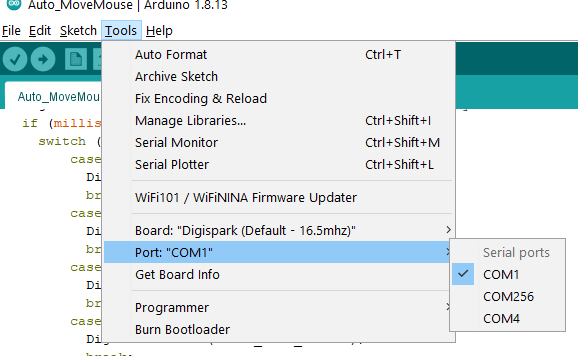
- Start compilation.
- Plug in the device after this message:
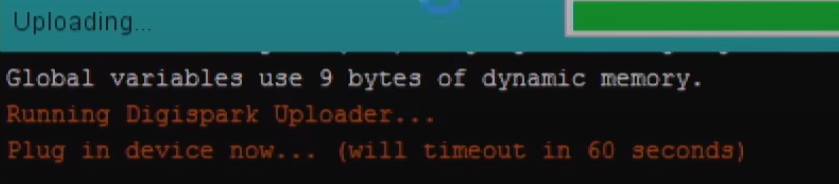
It will upload the code – and your ATTINY85 will appear as the mouse.
Use it wisely – e.g. during long presentations or meetings.
Leave a Reply